
IK Multimedia releases UNO Synth Editor on Mac/PC/iOS
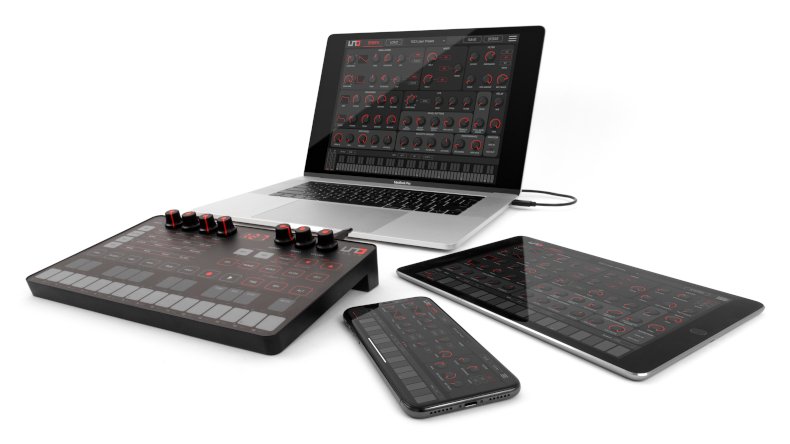
IK Multimedia has released a dedicated software editor for its first hardware synth, the true analog UNO Synth. Designed to offer deep control, the editor provides easy access to all parameters and provides advanced music making capabilities beyond the UNO Synth's compact front panel, with convenient support for Mac/PC and iOS devices.
Beyond traditional software editors, the UNO Synth editor offers the ability to function both as a standalone application (Mac/PC/iOS) and an integrated DAW plug-in with total recall (Mac/PC), for use in the studio, live performance or on-the-go music creation. It provides seamless integration and control of every parameter, and allows for easy customization of presets and for preference editing.
Analog and digital studios meet
The editor can be used as a software plug-in (Mac/PC) for all major DAWs including Ableton Live, GarageBand, Logic, Pro Tools, Cubase, Studio One, Reaper and more, for seamlessly creating, storing and recalling settings in a session.
For iOS* mobile musicians, the editor is also available as a free download for both iPhone and iPad, with full support for the new iPhone X. The UNO Synth Editor app offers all the same great control as the Mac/PC version.
*A lightning to USB adapter is required; iPhone/iPad operation requires battery power.
Virtual control with realtime response
For more precise control, the editor incorporates a full-size GUI that maintains the same look and feel as the UNO Synth hardware panel, while offering deeper programming settings and new sound sculpting options. Users can easily access functions on an intuitive virtual panel that offers even more ways to shape their sound.
For extreme flexibility, UNO Synth responds to parameter changes from the editor in real-time, while the editor can track changes made on the UNO Synth's front panel. All edits can also be saved directly into the UNO Synth, for instant recall.
The editor can also be used to change the operation of the Uno Synth's front panel knobs to suit different users' hands-on preferences. Three modes can be selected - Absolute, Relative and Pass-Through - to determine how the knobs behave when moving between different parameters, based on the user's preferred style of operation.
Create amazing sounds
The editor's Synth panel includes virtual knobs that allow users to easily tweak and edit synthesis parameters such as the oscillators and envelopes, fine tune additional control parameters, animate performance effects and much more. In addition, a full 88-note virtual keyboard is included, as well as virtual pitch and modulation wheels.
Specific Synth Panel sections include:
Oscillators and envelopes - this section lets users modulate waveform shapes for each oscillator via LFO or the filter envelope. Pulse width (Classic PWM) can also be modulated in the same way. In addition, full ADSR access is provided for both the filter and the amplitude envelopes for creating sweeps, punchy basslines, and more.
Amount knobs - users can control UNO Synth's five performance effects, by setting the speed of the DIVE and SCOOP pitch effects and setting the depth of the VIBRATO WAH and TREMOLO, adding instant and deeper animation. For even more precise control, additional Amount knobs are provided for ModWheel, Velocity, Delay Mix and Time, Pitch Bend and Glide.
Make your preferences known
The editor software is also useful for setting preferences. A dedicated menu allows an array of options to be set, ranging from MIDI routing to knob behavior selection. Users can adjust all MIDI settings including In and Out channels, Sync, Overflow and Soft Thru.
Connect your rig
UNO Synth can be configured for convenient integration in an existing rig. Users can map MIDI routings to freely assign communication across both the MIDI DIN ports and USB ports. Outboard gear and virtual apps can be instantly connected, enabling UNO Synth to be used as both a MIDI interface and MIDI controller.
Set and save
Presets stored on the UNO Synth, a Mac/PC, or an iPhone/iPad can be loaded into the editor for further refining. Edits can be saved directly in the editor, or loaded back into the UNO Synth, computer or iPhone/iPad. When used with a DAW, the UNO Synth editor will also recall settings from the previous session.
About UNO Synth
Designed for everyone interested in rich, true analog sound, the affordable, monophonic UNO Synth offers massive sound, a wide sound palette, and easy programmability in an ultra-portable, battery-powered format for on-the-go music creation, live performance or studio recording.
UNO Synth packs a powerful synth engine with professional sound and a full analog audio path on par with more expensive synthesizers. It includes two independent oscillators; a 2-pole OTA-based, analog, resonant, sweepable multimode filter; seven LFO waveforms, and much more.
It delivers everything from classic to modern sounds to create music in any genre. First-time synth users get instant gratification from this easy-to-use instrument. With 100 presets, an easy-to-play capacitive-sensing keyboard with selectable scales and an arpeggiator, UNO Synth is a perfect gateway into the synthesizer world. Experienced pros will also love its rich sound and easy portability.
Made in Italy, UNO Synth's ultra-compact dimensions make it among the smallest monophonic synths available. Its light weight (only 400g) and battery power (4xAA included) or USB power-supply (for battery power banks) give musicians the freedom to make music anywhere.
How to obtain
The UNO Synth editor is available as a free download for everyone (requires firmware 1.1.1 or above). For more information and to download the editor, please visit: www.unosynth.com/editor
To see more of the editor and to watch the UNO Synth tutorial series, visit: www.unosynth.com/video
For more information about UNO Synth, please visit: www.unosynth.com

Press Desk
Our Press Desk collects press releases from audio manufacters, software developers, and instrument manufacturers and distributors. All content is created by the original company or their PR representives and is only lightly edited for clarity where necessary.


