
Do your digital signals have the jitters?
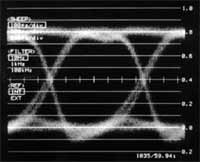
The problem - imprecise timing of a digital waveform will lead to noise being generated in the output of the digital to analog converter.
The solution - re-align ('reclock') the signal to a precise time reference before conversion. If this is done, jitter is never a problem.
Unfortunately - many items of digital equipment fail to reclock the signal adequately, therefore the problem of jitter remains.
The place where jitter normally finds its way into a digital signal is in cabling. Cables are prone to interference and also to reflections that confuse the digital signal.
Reflections occur in cables because electric signals travel as a wave motion. Just as a water wave will reflect from a solid object, so will an electrical wave reflect from a discontinuity in the signal path, such as the ends of the cable plugged into inputs and outputs.
Analog audio signals are low enough in frequency for reflections not to be a problem. You would have to have a cable hundreds of meters long to fit in a single wavelength. This is not the case with digital signals that are very much higher in frequency.
Reflections are caused by discontinuities. Precisely, these are discontinuities in impedance. 'Impedance' is the degree to which the flow of electric current is 'impeded' by a conductor, fairly obviously.
The impedance of a cable at frequencies where the wavelength is shorter than the cable length is determined by the capacitance and inductance of the cable. A bit of complicated math that we will skip over says that it doesn't matter how long the cable is, its 'characteristic impedance' will be the same. In these conditions, we say that the cable is behaving as a transmission line.
One of the earliest digital cable standards was AES-3-1992. This specified an output of 110 ohms impedance driving a cable also of 110 ohms characteristic impedance, hence no discontinuity and no reflection at that point. However the input impedance of whatever the cable was feeding was originally set to 250 ohms so that one output could potentially drive up to four inputs.
However, this was found to cause excessive reflections and the input impedance was re-specificed to be 110 ohms. So in a cable specified to AES-3-1992 standards, with XLR connectors, there are no reflections, or at least they are minimized. AES-3-1992 also specifies a balanced connection, which rejects interference. The signal level is a strong 2 to 7 volts.
Hence digital interconnections made using the AES-3-1992 standard, also commonly known as AES/EBU, do not introduce significant jitter. A digital to analog converter that was prone to jitter would not degrade the signal.
However there is also the S/PDIF digital interface. This is almost identical to the AES/EBU interface in terms of its digital specifications. But its electrical specifications are rather different - the impedance is specified as 75 ohms, it is unbalanced, the electrical level is a puny 0.5 volts, and the phono connector is used. Although 75 ohm impedance is specified, in practice many cables used for S/PDIF connections will differ significantly.
This means that an S/PDIF cable is prone to pick up interference, and to suffer from reflections if it is too long. Both of these lead to jitter that can upset an improperly designed digital to analog converter.
So although AES/EBU digital signals can be handled as analog signals with cable runs as long as necessary and patchbays using conventional jacks, S/PDIF signals need gentle handling. Cable runs should be as short as possible and the use of patchbays, although possible, is not recommended.

David Mellor
David Mellor is CEO and Course Director of Audio Masterclass. David has designed courses in audio education and training since 1986 and is the publisher and principal writer of Adventures In Audio.


