
Akai MPC 3000 MIDI Production Centre (part 5)
Sampling
Sampling can be a pleasure or it can be a chore, but when was the last time
you found it a pleasure? Probably when you first bought a sampler and the novelty
hadn’t worn off. I find sampling fun when I am in the middle of a production
and I have one particular thing I need to achieve. Then I find it challenging
and enjoyable to create exactly the right sample or combination of samples and
lay them into the track.
Otherwise, compiling collections of samples and mapping them out seems to be
a time consuming and often long winded process. It follows then that if Akai
can make sampling as straightforward and short a procedure as possible on the
MPC 3000, then the more value a user is going to get out of the machine. And
in fact, I can’t see how it could be simpler. Since the MPC 3000 is dedicated
as a drum sampler, you won’t find a looping option. (Is there such a thing as
a sustained percussion sound?), and since there is no keyboard on the unit,
mapping the samples to the pads is a doddle.
And if you want sounds to respond to particular MIDI note numbers, as well
you may, then you’ll find that each pad has an assignable number which you can
leave as it is or change as you wish. Of the various ways pad and note number
assignment could have been implemented, I think this is optimum. If I go through
the sampling procedure in a little detail, this will also give you an idea of
how the unit as a whole works.
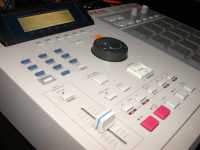
In the top right corner of the MPC 3000 is a bank of buttons labelled commands.
One of these is the Program/Sounds button which you press to get to the sampling
and programming functions. Once pressed the display will offer a numbered list
of eight options. To sample a new sound select option 5 on the blue data entry
buttons to the left of the command keys. The display will now offer options
such as analogue or digital input, mono or stereo samping, sample duration and
a couple of other items. There is also a stereo meter display with 'T’ and 'P’
indicators for the sample triggering threshold level and peak level. If you
give the input too much level then the 'P’ peak display will go all the way
over to the right and change to 'P!’ as a warning.
As with most of the screens of the MPC 3000, the Sample New Sound screen has
soft keys, in this case one to arm the sampler and another to reset the peak
display. Unlike a conventional sampler there is no need to set the MIDI pitch
of the note being sampled, since for percussion sources the concept of pitch
has a somewhat reduced meaning. Once the sample is taken, the soft keys change
to 'Playback’, 'Keep & Name’ and 'Discard’, whose functions are obvious.
One negative point here which could easily be fixed in a software update is
that if you are dealing with long samples, then once you start playback then
it will go all the way through to the end. This applies to when a sequence is
running too. I would have thought that the Stop key of the sequencer ought to
mean that sample playback is stopped too, since there really isn’t any point
in continuing the sample once you have made up your mind that you want to stop
and do something else. For short sounds of course it makes no difference.

David Mellor
David Mellor is CEO and Course Director of Audio Masterclass. David has designed courses in audio education and training since 1986 and is the publisher and principal writer of Adventures In Audio.


